I knew we’d dealt with squaremap on the Minecraft server. What I couldn’t remember was which version had failed, why it failed, and whether the fix had actually been deployed. I could have asked the agent to summarize the story again. I wanted to see the part where Paper rejected the plugin.
This is a fairly common problem in my Threave installation. The Minecraft conversation alone has a lot of history, and it’s one of many sessions in the sidebar. I’ve got others for this blog, BirdNET, a 3D printer, my farm app, and the app that manages all of them. An agent can remember a remarkable amount, but I’m still the person who has to decide what to trust and what to do next.
So I built search into Threave. Type squaremap, and I can find the conversation about the upgrade alongside the command output that showed the plugin failing to load. I can open the result at the relevant point in the session instead of scrolling through weeks of messages.
A search result can be more than a message
Coding agents leave several kinds of evidence behind. There are my requests and their replies, of course. There are also commands they ran, their output, the sessions they created to handle separate work, and the files in the current workspace.
Threave searches the saved session history across projects. If I’m in a session, it also looks through that session’s workspace files. Results are labeled so I can tell whether I’m about to open a message, a tool call, a session, or a file. I can filter down to one kind when the list gets crowded.
That distinction matters to me. A final reply saying “the tests pass” tells me what the agent concluded. The tool result showing the test command and its output tells me what it actually ran. Both are useful, and sometimes they disagree.
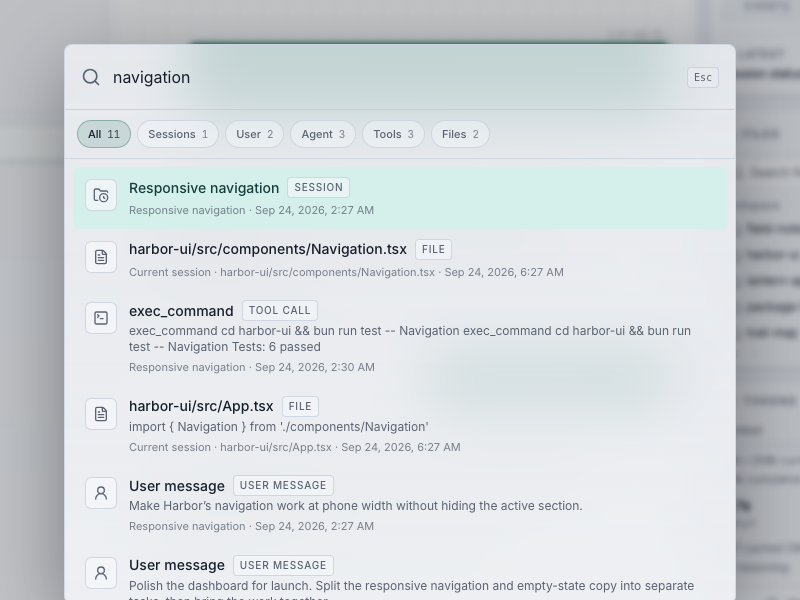
This image and the video below use Threave’s synthetic showcase. Harbor UI and its files are fictional; none of my personal sessions appear in the recording.
Try it on a fake project
The short recording searches for navigation in a fictional Harbor UI project. The results include a child session called Responsive navigation, a source file, a command that ran navigation tests, and the messages around the work. Then I filter to files and open the matching source, search again, filter to tools, and jump to the command in the child session.
The useful part happens after selecting a result. A file match opens the file in the workspace view. A match from the conversation takes me to that point in the saved history, even when it belongs to another session. I can go from “I think we fixed this” to the place where the work happened.
Search also includes archived sessions. Archiving is how I get an old project out of the sidebar; it doesn’t mean I want its history erased from every future question.
The agent can search, too
Threave has a CLI for the same job. An agent in a session can run something like:
| |
That searches the saved session history and the current session’s workspace. The results arrive by source, so the agent can start with session matches while file search finishes. With --session none, it searches the stored history without looking through workspace files.
When I researched five blog posts recently, I pulled history from several project sessions instead of depending on whatever happened to fit in the current conversation. The Minecraft plugin work was still there to inspect. Threave search makes that kind of digging much easier now.
It’s a different experience from asking an agent, “Do you remember what we did?” It can find the earlier run, read the actual output, and bring back a specific answer. I can do the same thing myself when I don’t need an agent involved.
It has edges
This is text search, so I still need some word or filename to start with. It isn’t a magical map of everything I’ve ever meant. If I search for a term nobody used in the session or files, I won’t find the thing I’m thinking of.
Workspace search is also scoped to the current session. I’m not asking a search box in one project to crawl my entire laptop. The saved Threave history is available across sessions, but files come from the workspace I’m working in.
And Threave runs on my machine. If that service isn’t reachable, the phone can’t ask it to perform a fresh search. The sessions weren’t deleted; I just need to reconnect to the computer that holds them.
Those boundaries are fine with me. What I needed was a quick way to find the command, message, or file that settled a question. I still ask agents to do new work every day. Search helps me remember what they already did.